
Oct 17
UI Improvement: Display selected game tags at the bottom of Game Filter with individual remove option
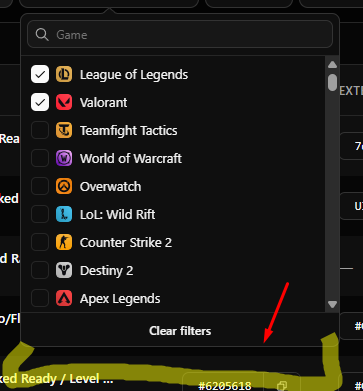
Currently, when selecting multiple games from the Game filter dropdown, scrolling down to search for more games makes it inconvenient to uncheck previously selected games. To uncheck one game, we have to scroll back up to find where it was checked, or click "Clear filters" which resets ALL selected games at once.
Feature Suggestion:
Please add selected game tags/chips right above or below the "Clear filters" button at the bottom of the dropdown list.
Benefits:
Selected tags remain fixed at the bottom, allowing us to easily remove/uncheck a specific game with a single click (X) without scrolling back up to find it.
Keeps the "Clear filters" option available if we want to reset everything at once.
This improvement would make filtering much faster and more user-friendly when dealing with multiple categories
Pending